
Listen to the
model thinking.
AudioLens shows you why a speech model said what it said. Load a clip, run Whisper or Wav2Vec2, and trace the prediction back through the audio and the model's layers: nine views, one shared timeline.
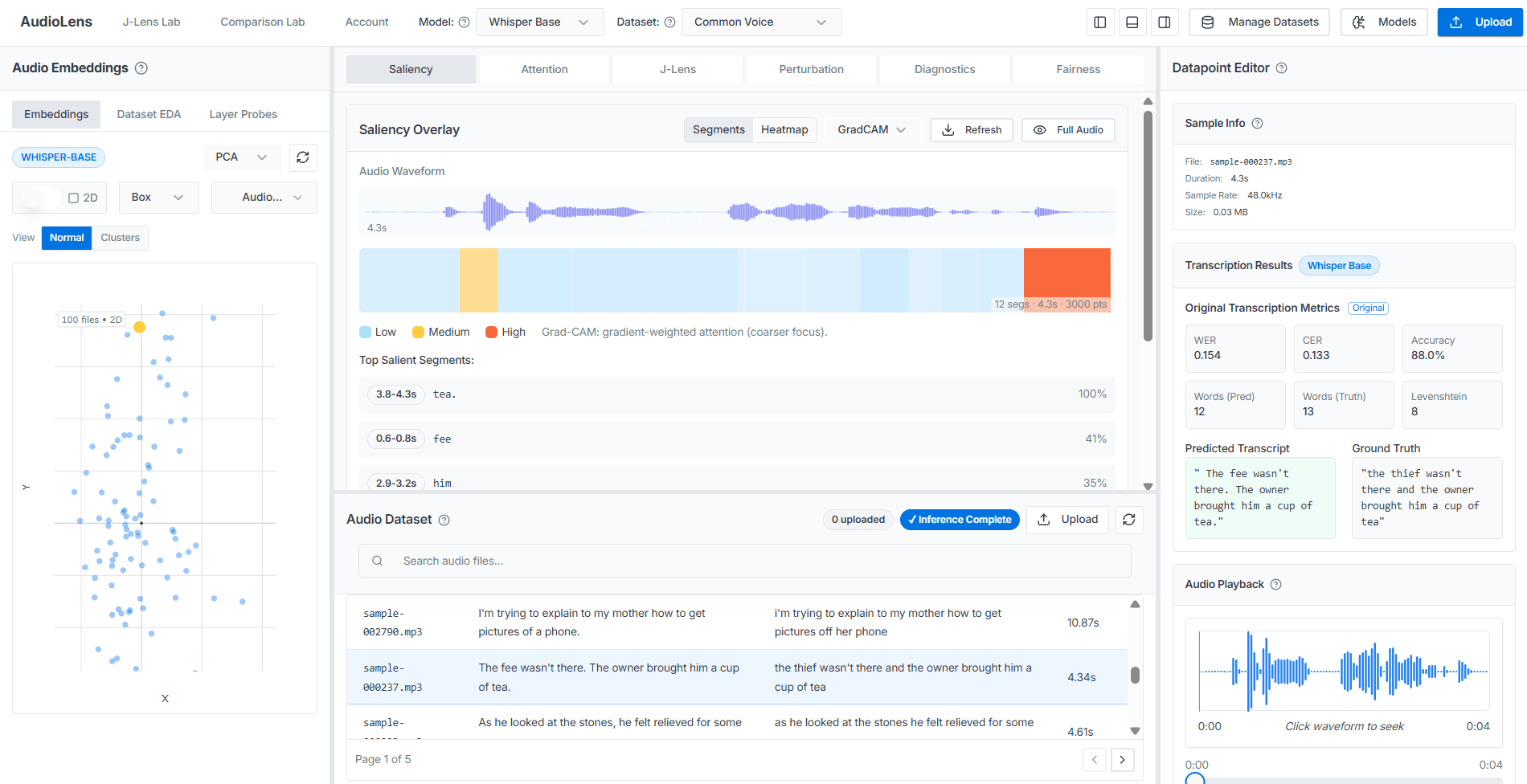
AudioLens is an open-source workbench for looking inside speech models. It's the audio counterpart to Google PAIR's LIT: instead of just reading a transcript or a label, you see which sounds, layers and features produced it.
- A browser workbench for explaining speech-model predictions
- Built for Whisper (speech to text) and Wav2Vec2 (speech to emotion)
- Interactive: each question is a click, not a new script
- A transcription, meeting-notes or call-analytics app
- Real-time: no microphone recording or live streaming
- Multilingual: it works on English speech only
- Researchers studying speech recognition or emotion models
- Engineers debugging a checkpoint before shipping it
- Teams auditing a model for accent or speaker bias
No scripts, no notebooks. Five steps in the browser, and every panel stays in sync with the same clip.
- 01Bring audio
Upload a .wav, .mp3, .m4a or .flac file (up to 100 MB and 10 minutes), or start from a built-in dataset you've fetched with one script.
- 02Pick a model
Whisper for speech-to-text, Wav2Vec2 for emotion, or point it at your own Hugging Face checkpoint.
- 03See the prediction
The model runs once and shows you its transcript or emotion label.
- 04Ask why
Open any panel. Each analysis runs in the background and attaches to the same clip, so switching views never means re-uploading.
- 05Stress-test
Re-run the clip under noise or pitch changes, or slice results by speaker group, to see where the prediction breaks.
- Under the hood every step is a REST job: upload, queue, poll. API reference
Saliency and attention trace a prediction back to the moments in the audio, and the layers, that produced it.
Embeddings, layer probes and the Jacobian Lens show how the model represents speech inside, layer by layer.
Perturbation, diagnostics, fairness slices and dataset EDA test it against noise, accents and the data itself.
Nine panels, each built around one question. All of them read the same clip and the same prediction.
Saliency mapping
Which part of the audio made it say this word?
Per-token attribution over the waveform, with a faithfulness check (deletion curve, before/after) that tells you whether to trust the map.
Attention
Where is each layer looking?
Per-layer, per-head attention weights across Whisper's encoder and decoder, custom checkpoints included, one layer and head at a time.
Embedding projector
Which clips does the model treat as similar?
Project learned representations into 2D or 3D, cluster them with HDBSCAN, and pull nearest neighbours for any point you select.
- Whisper Base
- Whisper Large-v3
- Wav2Vec2 emotion
- Bring your own Hugging Face model
- Common Voice
- RAVDESS
- L2-ARCTIC
- Speech Accent Archive
- LibriSpeech-1000
Whisper and Wav2Vec2 checkpoints are Apache 2.0. Datasets: a script fetches each one from its official source (L2-ARCTIC needs a free registration, Common Voice a Kaggle account) and each carries its own license — see loading datasets and the licenses page before using them commercially.
Pick a video to bring it to the stage. Playback loads from YouTube only after you press play.
What AudioLens is, and the questions it helps you ask of a speech model.

What do I need to run it?
Docker with Compose. A GPU is optional: AudioLens picks CUDA, ROCm or Apple MPS when one is available and falls back to CPU otherwise. Model weights download the first time a job needs them. Read the quickstart.
Is there a hosted demo?
Yes. A limited public demo is live with all features available — no install required. Open the demo.
What audio can I upload?
WAV, MP3, M4A or FLAC files, up to 100 MB and 10 minutes each. You can also skip uploading and start from one of the built-in sample datasets. Uploads expire after 24 hours; datasets fetched with the scripts stay on disk until you delete them. See the datasets.
Which Hugging Face models will work?
Speech Seq2Seq models like Whisper, CTC models, and audio-classification models like the Wav2Vec2 emotion checkpoint. Classification models must define id2label, and repos that need remote code are rejected. Registration validates the model up front, so an unsupported one fails immediately instead of running with wrong assumptions. Read the custom checkpoint guide.
Can I script it instead of using the UI?
Yes. Every panel is a thin client over the REST API, so anything you can click is also an endpoint you can call. A few shell and Python scripts cover starting the stack, checking queues and fetching the sample datasets. Browse the REST API.
How do I know a saliency map is right?
You check it. The faithfulness test deletes the audio the map calls most important and measures how far the prediction falls, against deleting random audio. If the map doesn't beat chance, don't trust it. Read about faithfulness.
Where does my audio go?
It stays on your machine. There are no accounts: uploads belong to an anonymous session and expire after 24 hours, and nothing is phoned home.
What's the license?
AudioLens itself is MIT. The models and datasets it works with keep their own terms, listed one by one. No dataset audio is redistributed; you fetch it from the official source. See the licenses.
Can I use the sample datasets commercially?
Not necessarily. RAVDESS, L2-ARCTIC and the Speech Accent Archive are licensed for non-commercial use only, Common Voice is CC0, and SAVEE's terms are unverified. Check each dataset's license before using it outside research or personal use. See the per-dataset licenses.
Where did it come from?
It builds on ECHO, an MIT-licensed audio interpretability tool created by Anas Hussaindeen, Chandupa Ambepitiya and Dewmike Amarasinghe. Read the attribution.
Self-hosted, MIT licensed, no telemetry. One command brings up the API, worker and workbench.
$ docker compose up --build